Optimising Docker Builds for Go
This article describes how to improve build time for Docker containers with Go applications. It focuses on speeding up the build process rather than building images from scratch.
Problem to Solve
Let's start with an issue definition: Building a Go app on a laptop is quick, but building the same app inside Docker takes ages.
Why is building an app on a local machine fast?
Golang produces a binary file. Do you remember C? C also produces a binary file. Let's recap how we could compile a program in C. I promise, we will get back to Go soon.
Let's consider the simplified Makefile below:
CFLAGS := -Wall -Werror
.default: app

.PHONY: app
# Let's cheat a bit and hardcode main.o, foo.o and bar.o
app: foo.o bar.o main.o
   # link object files
   ${CC} -o app $^

# Build ${name}.o based on ${name}.c
%.o: %.c
   @echo building $@
   ${CC} ${CFLAGS} -c $<

# Remove object files and binary
clean:
   rm -vf *.o app
Running make app will build an app artefact. Let's break it down to understand when it's slow and when it's fast.
- What if it's a clean build?
There are no object files, so
CC(clang) will create object files.foo.owill be created based onfoo.c,bar.obased onbar.cand so on. Once all object files are ready,CCwill link them creating our app. Because creating object files takes time, the build will be slow. - What if
make appis invoked again? All object files are already in place, soCCwill just link them again. Very little computing power is required, so the action will be quick. - What if we modify only
foo.c? Modification tofoo.cwill enforcefoo.orecreation.bar.owill stay untouched.CCwill link object files again. Only required files are rebuilt.
The fewer actions the computer performs, the faster the response.
Let's get back to Golang
If you run go help cache:
The go command caches build outputs for reuse in future builds.
The default location for cache data is a subdirectory named go-build
in the standard user cache directory for the current operating system.
Setting the GOCACHE environment variable overrides this default,
and running 'go env GOCACHE' prints the current cache directory.

The go command periodically deletes cached data that has not been
used recently. Running 'go clean -cache' deletes all cached data.
So Golang has a very similar approach; it uses a cache to preserve build outputs. If build outputs are present, less compute power is required to compile the program and local execution is quicker.
How Docker Layers Work
If a layer is already present on the machine, it will be reused. If the layer changes, then all downstream layers need to be rebuilt. As per the picture below, all layers from COPY to the end of the Dockerfile will re-run, which is time-consuming.
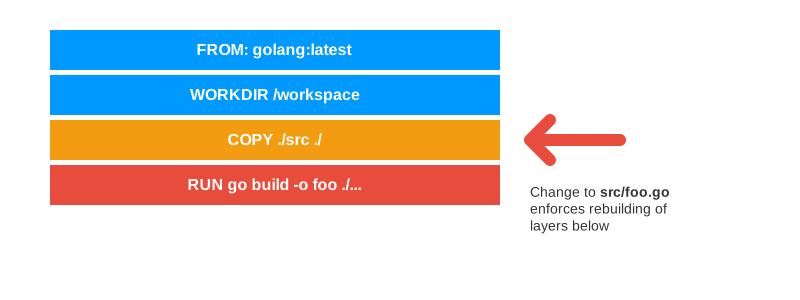
Assuming the previous build inside Docker generated 99% of the reusable build outputs, they are not available to the next build because the cache from the old layer is discarded.
Fortunately, Docker offers cache management, which makes it possible to reuse cached files between runs even if layers are changed.
Consider this Dockerfile:
FROM golang:latest as builder
WORKDIR /workspace
ENV CGO_ENABLED=1
ENV GOCACHE=/go-cache
COPY ./src ./
RUN --mount=type=cache,target=/go-cache go build -o app ./...

FROM scratch
COPY --from=builder /workspace/app /bin/app
ENTRYPOINT ["/bin/app"]
Please focus on the GOCACHE environment variable. It has been overwritten to point to a custom location to mitigate operating system and Go installation method differences. Later its location is explicitly specified as a cache for a go build command.
The first run will populate GOCACHE with the actual cache. Subsequent builds will be faster as they can benefit from the existing cache. Assuming only a single file has changed, the vast majority of build outputs can be reused.
Caching Dependencies
Further inspection suggests that changing go.sum or go.mod forces re-fetching all dependencies over and over. Any change to go.sum forces a re-run of all depending layers which includes go mod download.
Can we use the same approach to solve the dependency caching issue? Sure we can. This time we're going to focus on caching GOMODCACHE.
Let's extend the Dockerfile to cover dependencies caching:
FROM golang:latest AS builder
WORKDIR /workspace
ENV CGO_ENABLED=1
ENV GOCACHE=/go-cache
ENV GOMODCACHE=/gomod-cache
COPY ./src/go.* ./
RUN --mount=type=cache,target=/gomod-cache \
  go mod download # line to be removed in final, production ready dockerfile
COPY ./src ./
RUN --mount=type=cache,target=/gomod-cache --mount=type=cache,target=/go-cache \
  go build -o app ./...

FROM scratch
COPY --from=builder /workspace/app /bin/app
USER 65333
EXPOSE 8080
ENTRYPOINT ["/bin/app"]
Both the dependencies and build outputs caches are present and will be used by the Docker build. Only missing dependencies will be fetched and stored with the cache. Let’s consider the picture below.
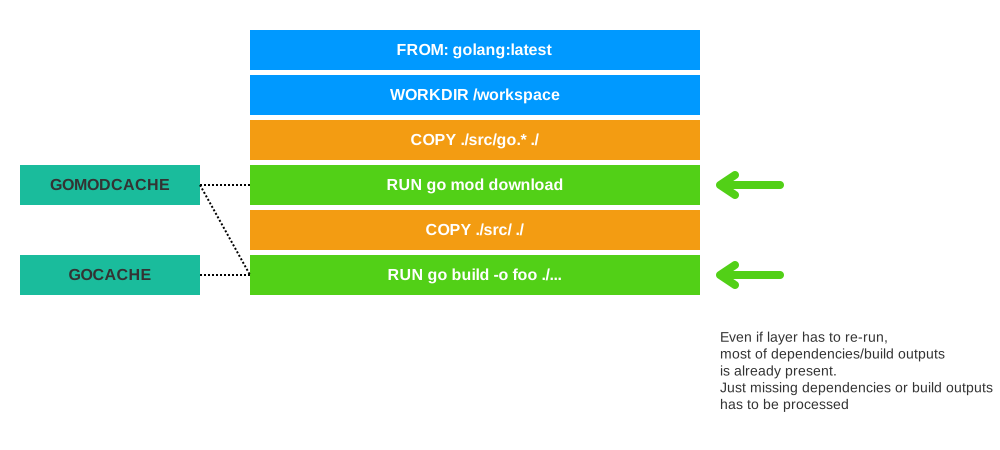
Green layers are re-run, but thanks to the cache, their execution time is reduced to a minimum. Now Docker build is much faster 🤩.
But are all steps needed?
Nah… We can safely remove:
RUN --mount=type=cache,target=/gomod-cache \
  go mod download
go mod download will pull all dependencies defined in go.mod. go build will pull only those which are actually required and the sequential dependency between the pull and build steps is no longer a concern.
Static Linking with CGO_ENABLED=0
By default, Go might use cgo to link against the host's C libraries (like libc). This creates a dynamic binary that requires those libraries to be present at runtime. Since the scratch image is empty, a dynamic binary will fail to start with a cryptic "file not found" error.
Setting CGO_ENABLED=0 forces Go to produce a statically linked binary. This has three major benefits:
- Portability: The binary contains everything it needs and can run on any Linux kernel.
- Security: By using
scratch, your production image contains zero shell, zero package managers, and zero C libraries, drastically reducing the attack surface. - Size:
scratchimages are as small as they can possibly be—literally just your binary and any assets you explicitly include.
Performance Impact of CGO
While the primary reasons for CGO_ENABLED=0 are portability and security, there is a tangible impact on build performance. In a clean build environment (like a CI worker), disabling CGO avoids the overhead of invoking the C toolchain (compiler, linker).
For a large project like minikube, the difference is noticeable:
- CGO_ENABLED=0: ~32.3s total
- CGO_ENABLED=1: ~40.1s total
By disabling CGO, we achieved a ~20% faster clean build 🤯. At runtime, pure Go code also avoids the overhead of stack switching required when calling C code, though for most web applications, this difference is negligible compared to the build-time gains.
tested with minikube codebase as follow
time CGO_ENABLED=1_OR_0 GOOS="darwin" GOARCH="arm64"  \
        go build -tags "libvirt_dlopen" -ldflags="-X k8s.io/minikube/pkg/version.version=v1.37.0 -X k8s.io/minikube/pkg/version.isoVersion=v1.37.0-1765151505-21409 -X k8s.io/minikube/pkg/version.gitCommitID="d96de0585719fe650d457f0055205b427d4b7bdb" -X k8s.io/minikube/pkg/version.storageProvisionerVersion=v5" -a -o out/minikube-darwin-arm64 k8s.io/minikube/cmd/minikube
Solution Limitations
The proposed approach is not limitless. It's 2023 2026, a big chunk of work is happening in the cloud with ephemeral workers. This means the cache won't be available for sub-sequential runs, as the worker won't exist anymore.
This issue may be mitigated by rsync. It's possible to rsync the content of the cache to layer and push the builder image to registry or rsync it to the s3/gcs bucket. This solution comes with a price tag: The builder image will be heavy and a time penalty will be added to every build (rsync takes time). It's important to remember that the mounted cache is not stored within the layer, so it won't be pushed within the builder image by default.
Even if further enhancements with rsync and pushing builder image to the registry is possible, I'd suggest checking if the local cache is enough, as the complexity & price tag of the extended solution may outweigh its benefits.
CI/CD and Remote Caching
Fast forward to 2026: Remote Cache Backends have become the "missing link" that solves the ephemeral worker issue. However, it is crucial to understand the distinction between Layer Caching and Cache Mounts:
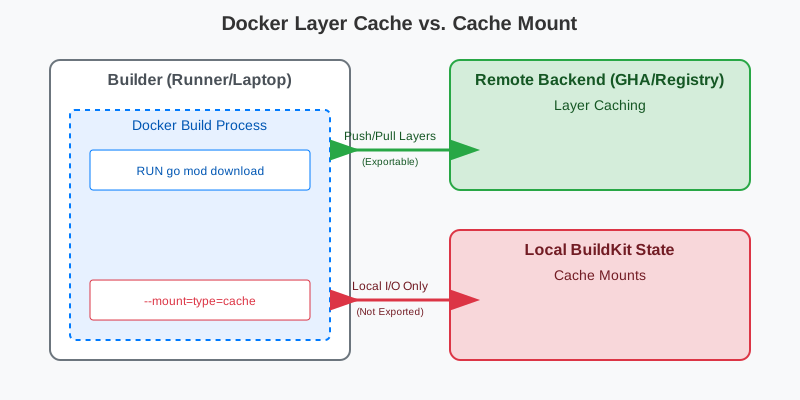
- Cache Mounts (
--mount=type=cache): These are designed for on-machine persistence. They are extremely fast but stay local to the BuildKit instance. They are not exported by remote backends. - Layer Caching (
--cache-to/from): These backends (likeghaorregistry) export the finalized image layers to an external service. These are persisted across ephemeral runners.
GitHub Actions Backend
If you are using GitHub Actions, the gha backend is an efficient way to share layer cache across runs. Because type=cache mounts are not exported, you should combine them with a Dependency Layer Pattern for the best results on GHA.
COPY go.mod go.sum ./
# this layer can be cached by layer cache
RUN go mod download

COPY . .
# this layer can not be cached by layer cache. it's only cache mount
RUN --mount=type=cache,target=/go-cache go build -o app ./...
To enable this in your workflow:
uses: docker/build-push-action@v6
with:
  context: .
  file: Dockerfile
  push: false
  cache-from: type=gha
  cache-to: type=gha,mode=max
  tags: my_app/my_service:{{ github.sha }}
  build-args: |
    BUILD_VERSION=${{ github.sha }}
The mode=max tells BuildKit to export all intermediate layers, including your go mod download layer, ensuring that subsequent runs on fresh workers can skip the download entirely.
Registry Backend
Alternatively, you can store the cache directly in your Docker registry. This is useful if you are using a CI provider other than GitHub Actions or want a unified cache location.
docker buildx build \
  --cache-from=type=registry,ref=my-repo/app:build-cache \
  --cache-to=type=registry,ref=my-repo/app:build-cache,mode=max \
  -t my_service .
Summary
Specifying custom paths for GOCACHE and GOMODCACHE provides installation-independent paths and reduces dependency on the underlying OS.
ENV GOCACHE=/go-cache
ENV GOMODCACHE=/gomod-cache
For the balanced performance, you may consider adopting a hybrid approach:
- Use Image Layers (e.g.,
RUN go mod download) for dependencies you want to persist across CI runs viaghaorregistrybackends. - Use Cache Mounts (
--mount=type=cache) to speed up local development and internal stages of a single build.
But I'd advise to stick to one approach. Hybrid means problems from both sides.
Let's Talk Numbers
For the tests purposes given Dockerfiles focused on local build performance were added to local copy minikube project.
Dockerfile.with-caching:
FROM golang:latest AS builder
RUN apt-get install -y make
WORKDIR /workspace
ENV GOCACHE=/go-cache
ENV GOMODCACHE=/gomod-cache
COPY ./go.* ./
RUN --mount=type=cache,target=/gomod-cache \
  go mod download # this line exists only to show time saved on fetch step. it should NOT exists in actual dockerfile
COPY ./ ./
RUN --mount=type=cache,target=/gomod-cache --mount=type=cache,target=/go-cache \
   make linux
Standard Dockerfile.without-caching:
FROM golang:latest AS builder
RUN apt-get install -y make
WORKDIR /workspace
COPY ./go.* ./
RUN go mod download
COPY ./ ./
RUN make linux
Changes to source code were done using commands like:
# change code
sed -i "s/expected docker.EndpointMeta/expected docker.EndpointMeta ${RANDOM}/g" cmd/minikube/main.go
# change deps
go get go.opentelemetry.io/otel@main
Results once the cache has been populated by the previous build and the code has been changed:
With caching enabled: Building 36.0s (14/14) FINISHED
[builder 7/9] RUN --mount=type=cache,target=/gomod-cache go mod download0.8s[builder 8/9] COPY ./ ./1.6s[builder 9/9] RUN --mount=type=cache,target=/gomod-cache --mount=type=cache,target=/go-cache make linux33.6s
Without caching enabled: Building 114.2s (12/12) FINISHED
[5/7] RUN go mod download65.7s[6/7] COPY ./ ./1.1s[7/7] RUN make linux37.4s
The biggest advantage of caching is shown with the go mod download step, where time was reduced from 65.7s to 0.8s.
Note: This article prioritizes local build speed over CI/CD performance. For CI/CD improvements, you should focus more on the CI/CD and Remote Caching section.